Example Walkthrough
This chapter walks through a couple of typical PyKYLIE use-cases.
Basic Usage
PyKYLIE can be run from the command line to replicate the functionality provided by KYLIE.
Preparation
First, you’ll need to use the BRUCE code to generate a time-series of perturbed surface models. Follow these steps to download, build and run BRUCE:
Download the tarball file bruce-2.84-4.tar.gz and unpack it.
Change into the
bruce-2.84-4subdirectory.Compile the BRUCE code using the command FC=gfortran RANLIB=ranlib make.
Download the BRUCE input file bruce.in [1], saving it into the current directory.
Run BRUCE using the command ./bruce/bruce < bruce.in.
You’ll also need to grab a suitable MSG specgrid file; download sg-BSTAR2006-high.h5, also saving it into the current directory.
Creating a KYLIE Input File
Create a new KYLIE input file kylie.in in the current
directory, with the following contents:
#fields {
  number_of_fields:20
  dump_filestub:model-
}

#waveband {
  start_wavelength:6675
  finish_wavelength:6685
  wavelength_resolution:0.1
}

#specgrid {
  file_name:sg-BSTAR2006-high.h5
  Z/Zo:1.0
}
The syntax of this file follows the description in Appendix F of Townsend (1997b), but with the additional appearance of a #specgrid command. This command must contain a file_name parameter that specifies the name of the specgrid file to use. It can also contain additional parameters detailing the atmospheric parameters that are needed to access the specgrid; in this example, the parameter Z/Zo=1.0 indicates we want to synthesize spectra at solar metallicity.
Running PyKYLIE
Run PyKYLIE fron the command line via
python -m pykylie kylie.in
This will create a series of files (model-001.ecsv,
model-002.ecsv, …) containing disk-integrated flux spectra
in extended comma-separated variable (ECSV)
format.
Plotting the Spectra
The spectra are straightforward to read in and plot in Python:
[1]:
import matplotlib.pyplot as plt
import astropy.table as at

# Read and plot the spectra

plt.figure()

offset = 0

for i in range(20):

    # Read the flux

    tbl = at.Table.read(f'model-{i+1:03d}.ecsv')

    # Plot the flux

    plt.plot(tbl['wavelength'], tbl['flux']+offset)

    # Update the offset (for stacking the spectra vertically)

    offset += tbl['flux'][0]*0.02

plt.xlabel(f'Wavelength [{tbl["wavelength"].unit}]')
plt.ylabel(f'Flux [{tbl["flux"].unit}]')
[1]:
Text(0, 0.5, 'Flux [erg / (Angstrom s cm2)]')
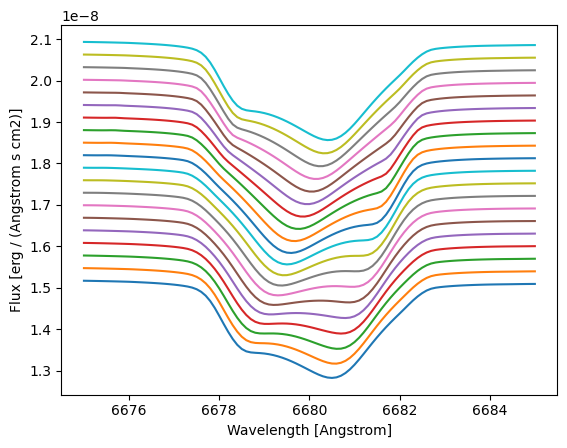
This plot illustrates the profile variations in the HeI \(\lambda6678\) line [2], arising from the surface velocity, temperature and geometry perturbations caused by the \(\ell=2\) pulsation mode. As is typical of prograde modes, bumps move from blue to red in the profile.
Advanced Usage
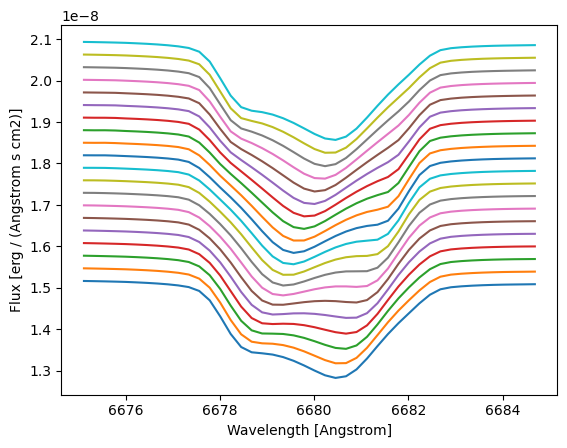
In addition to running PyKYLIE from the command line, there’s the option of interfacing with it from inside a Python script. This can allow more flexibility in configuring things. The following code reprises the calculation above, but now adopting a wavelength abcissa with constant resolving power \(\mathcal{R} \equiv \lambda/\Delta \lambda = 30,000\).
[3]:
import pymsg as pm
import pykylie as pk
import numpy as np

# Load the specgrid

specgrid = pm.SpecGrid('sg-BSTAR2006-high.h5')

specgrid.cache_limit = 2048 # To improve performance

# Set up bin wavelengths -- uniformly spaced in Delta log(lambda) to yield
# a constant resolving power

lam_min = 6675
lam_max = 6685
R = 30000

lam = np.exp(np.arange(start=np.log(lam_min), stop=np.log(lam_max), step=1/R))

# Set up mid-point wavelengths

lam_mid = 0.5*(lam[1:] + lam[:-1])

# Calculate and plot the spectra

plt.figure()

offset = 0

for i in range(20):

    # Read the BRUCE model

    model = pk.read_bruce_model(f'model-{i+1:03d}')

    # Evaluate the flux

    flux = pk.integrate_flux(model, specgrid, lam, x_add={'Z/Zo': 1.0})

    # Plot the flux

    plt.plot(lam_mid, flux+offset)

    # Update the offset (for stacking the spectra vertically)

    offset += flux[0]*0.02

plt.xlabel('Wavelength [Angstrom]')
plt.ylabel('Flux [erg / (Angstrom s cm2)]')
[3]:
Text(0, 0.5, 'Flux [erg / (Angstrom s cm2)]')
footnote